


Style Chat: AI Outfit Maker
4.26.00 Reviews
App Specs
- Version
- 1.0.106
- Updated On
- License
- Free
- Downloads
- 50,000+
- Developer
- dr-code.ai
- Categories
- Beauty
- Platform
- Android
Screenshots
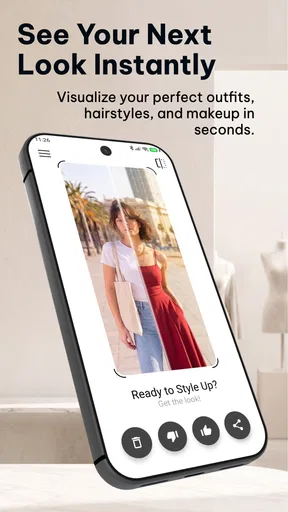
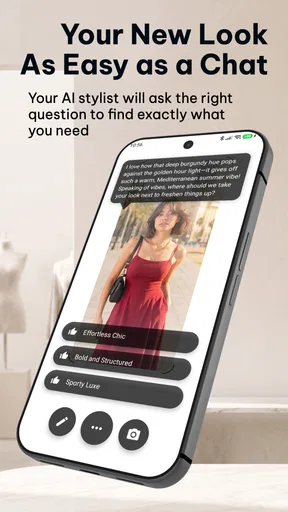
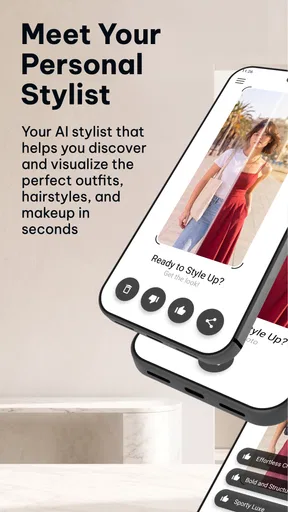
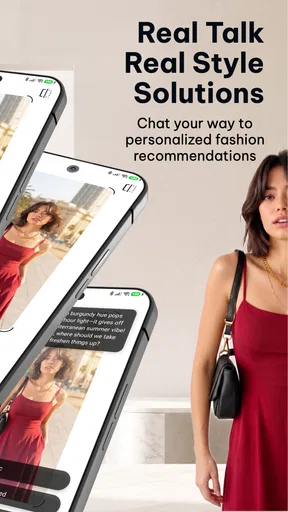

 Analysis by AppCompare
Ever found yourself staring at your wardrobe, completely clueless about what to wear? I’ve been there, and let me tell you, it’s not the most fun way to start the day. Enter Style Chat: AI Outfit Maker, an app that promises to take the guesswork out of getting dressed and make you the fashionista you’ve always dreamed of being. Let’s dive into this sartorial lifesaver and see if it lives up to its hype.
Where the app stands today
I see Style Chat as a fashion app for people who want a quick source of outfit ideas, not as a replacement for trying clothes on in person or developing a personal style from scratch. Its focus is practical: use AI to explore clothing combinations, experiment with hair and makeup looks, and get styling help through chat. That mix makes it more useful for visual brainstorming than for shoppers who need exact garment measurements or a guaranteed match to a particular item in a store.
The app is made by dr-code.ai and is free to download, with optional in-app purchases ranging from $0.49 to $34.99 per item. It has a 4.2 average from 80 ratings and more than 10K installs. Those figures suggest that people are trying it, though I wouldn’t treat them as proof that every suggestion will suit every wardrobe. It’s rated for Everyone, and the current version is 0.1.0-231, so I’d approach it as an early-stage product whose usefulness can depend on how well its current tools fit your routine.
What the version details tell me
The app was released on April 8, 2026, and its version number, 0.1.0-231, points to a product still at an early point in its development. That is not a promise of a particular roadmap or a guarantee of future changes. It does affect how I would judge it: I’d try the core styling experience first, then decide whether it is dependable enough to become part of a daily routine.
For someone already using it, the sensible approach is to keep expectations tied to what works now rather than assume the app will learn a particular preference or improve in a specific way. If a suggested outfit misses the mark, I’d use that result as a cue to give the chat a clearer prompt or try another visual direction, rather than relying on an imagined history of personalization. The version information gives readers a useful snapshot of its present stage, but it doesn’t establish what has changed between releases.
Getting Started with Style Chat
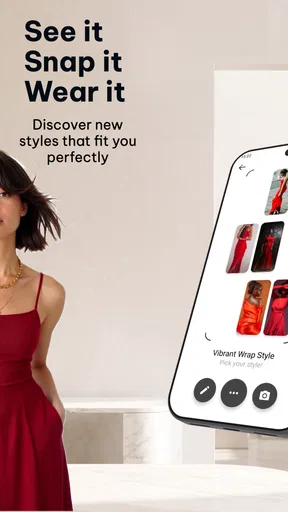
The first thing that grabbed my attention when I downloaded Style Chat was how clean and intuitive the user interface was. It’s like stepping into a virtual closet that actually makes sense—a far cry from my tangled heap of clothes. Setting up the app is a breeze. Just upload pictures of your wardrobe, and the AI does its magic, suggesting outfits for every occasion.
What I really loved was the straightforwardness of adding items. Snap a pic, add a few details like color and type, and boom, it’s in your digital closet. The app’s AI then uses this info to create outfits. It’s like having a personal stylist who knows your wardrobe inside out!
Worth Reading Before You Choose

EA SPORTS FC Mobile 26 Is a Bigger Football Game, but It Takes Time

Flipboard Shows What News Apps Must Do Beyond the Feed

Switching to Android Auto Means Rethinking Your Driving Routine

Google Calendar Makes a Crowded Week Easier to Manage

Ludo King Makes the Most of the Minutes Between Plans

Baby Panda World Brings Quick Play to Modern Phones, but Its Game Library Feels Busy
Features that Make a Difference
Now, let’s talk features. One of the most impressive aspects is the AI’s ability to learn your style over time. The more you use it, the better it gets at suggesting outfits that match your vibe. It's like it reads your mind—or at least your style mind.
Another cool feature is the “Occasion” selector. Whether you’re heading to a casual brunch or a formal dinner, the app tailors its suggestions accordingly. I’ve even used it to plan my outfits for a weekend getaway, and it nailed it every time.
Plus, there’s a “Trends” section that keeps you updated with the latest fashion news and trends. It’s a great way to spice up your wardrobe with trendy pieces without losing your personal touch.
Making the advice useful in real life
I’d get the most from the wardrobe-photo workflow by adding a few versatile pieces first instead of trying to catalogue everything in one sitting. A neutral top, a jacket, and a pair of trousers give the app useful building blocks without turning setup into a weekend project. I’d also photograph items in clear light against a simple background; that makes the clothing easier to recognize and gives you a better basis for visual suggestions. This is a practical way to reduce friction, not a guarantee that every image will be interpreted perfectly.
For a realistic morning, imagine that I have ten minutes before leaving and know the weather is mild, but I’m undecided about what feels right for a casual workday. I can ask for a relaxed, presentable combination and use the response as a starting point, then check the actual items in my closet. The useful part is narrowing the choice, not handing over the final decision. If the result includes something I don’t own, I can treat it as inspiration and substitute a similar piece rather than abandoning the whole outfit.
That substitution step is where I think the tool can help people get more value from clothes they already own. Instead of shopping whenever an outfit feels incomplete, I can use a suggested color pairing or silhouette as a prompt to test combinations I have overlooked. For a new purchase, I’d add or describe the item and see what existing pieces might work with it before buying more. It’s not a substitute for checking fabric, fit, or quality, but it can make the styling question more concrete.
Daily Fashion Inspiration
Every day, the app serves up a dose of fashion inspiration. It’s like having a fashion magazine tailored just for you. The “Inspiration” section features curated looks that you can easily replicate with your own clothes. It’s a lifesaver on those days when you feel like you have absolutely nothing to wear.
Interactive chat with the AI also adds a fun twist. It’s like texting a fashion-savvy friend. “What should I wear today?” you ask, and the suggestions start rolling in. It’s responsive, friendly, and gets you in the right outfit mood.
How it compares with familiar alternatives
Compared with a standard outfit-planning app built around a static closet catalogue, this experience puts more emphasis on AI conversation and visual experimentation. That can feel more natural when I have a vague request—something comfortable for dinner, for instance—than sorting through saved looks one by one. A conventional wardrobe tracker may still be better for someone who mainly wants meticulous inventory, repeatable packing lists, or a carefully maintained record of every garment. Style Chat makes more sense when the goal is to get ideas and try a different direction.
It also differs from browsing fashion feeds or shopping apps. Those can show polished looks and products, but the challenge is translating them into clothes already at home. Here, the wardrobe angle and styling prompts can help bridge that gap. The trade-off is that a generated visual or suggestion should be treated as a concept, not proof that a real garment will fit, drape, or look exactly as pictured. If I need reliable sizing, fabric details, or purchase comparisons, I’d use a retailer’s product information or try the item on instead.
Where I’d be cautious
AI styling can be only as useful as the context it receives. A short prompt such as “make me look good” leaves too much room for guesswork, while noting the occasion, mood, and pieces I want to wear gives the chat something more specific to work with. I’d also be clear when I want a look to build around one item, rather than expecting the app to infer which part of my wardrobe matters most. This kind of prompt refinement is a small effort, but it can make the suggestions easier to judge.
There are also practical reasons not to treat outfit generation as a final verdict. Personal comfort, cultural expectations, workplace dress codes, and weather can matter more than a visually appealing combination. I’d check those constraints myself before getting dressed. Hair and makeup try-on ideas can be useful for exploring a look, but they are still a starting point for experimentation; anyone looking for professional beauty advice or a precise preview of a finished result should use their own judgement and, where needed, consult a relevant professional.
The optional purchases are worth considering before building a habit around the app. Since it is free to start but includes paid items, I’d explore what I can do without paying and look at the price shown for any purchase before confirming it. I wouldn’t spend simply because a suggestion feels incomplete: first I’d see whether a clearer prompt, another outfit idea, or an item I already own solves the problem. That keeps the app in the role of a styling aid rather than turning every moment of indecision into a reason to buy something.
Who will get the most from it
I’d recommend trying it if you enjoy experimenting with clothes but often stall at the point of putting a look together. It may also suit someone who wants fresh combinations from a small wardrobe, is planning outfits for a trip, or likes seeing how a new item might fit into an existing style. The chat format is especially appealing if you find browsing galleries less helpful than describing what you need in ordinary language. Since the minimum OS is 11, I’d also check device compatibility before planning to install it.
On the other hand, I’d skip it if I wanted a precise digital record of garment dimensions, a guaranteed representation of fabric and fit, or a stylist who understands my preferences without any back-and-forth. It is also not the best choice for someone who dislikes uploading clothing photos or would rather make every decision without AI suggestions. A notebook, a photo album of outfits that already work, or advice from a human stylist may be a better fit for those needs.
Endless Outfit Combinations
One of the things I found most useful is the app’s ability to generate endless outfit combinations. You know how you sometimes buy a piece of clothing and have no idea how to style it? Yeah, guilty as charged. But with Style Chat, you just input the new item, and voilà, you have multiple outfit suggestions at your fingertips.
The app also helps in maximizing your wardrobe by encouraging you to mix and match in ways you might not have considered. It’s like turning your closet into a never-ending runway.
What I’d watch as I keep using it
Because the product is at an early version, I’d pay attention to whether the app’s suggestions stay useful after the novelty wears off: can I get a practical answer for an ordinary day, and can I steer it when my first prompt misses? I’d also notice whether the experience makes it easy to work with clothes I actually own, rather than nudging me toward looks that depend on buying more. These are the everyday tests that matter more to me than a long list of possible features.
Existing users can judge changes by comparing the results they receive for similar requests over time, while keeping in mind that a different photo or prompt can affect the outcome. I wouldn’t assume a new version has improved a particular capability until I see that improvement in my own use. For now, a good habit is to save or remember combinations that genuinely work, so a useful suggestion can become part of a repeatable routine rather than disappearing after one chat.
Final Thoughts
In a world where fast fashion dominates, Style Chat: AI Outfit Maker encourages a more thoughtful approach to dressing. It’s about making the most of what you have, being creative, and feeling confident in your style choices. Whether you’re a fashion enthusiast or someone who just wants to make getting dressed easier, this app is a fantastic tool.
So, if you’re tired of the “I have nothing to wear” blues, give Style Chat a try. It might just become your new fashion BFF. Happy styling!
Pros
- Intuitive interface for easy navigation.
- Wide range of style suggestions.
- AI learns your preferences over time.
- Daily outfit inspirations available.
- Supports multiple fashion categories.
Cons
- Limited free features without subscription.
- Occasional AI recommendation errors.
- Requires stable internet connection.
- No offline mode for outfit planning.
- Some styles may not suit all tastes.
FAQs for Style Chat: AI Outfit Maker
What is Style Chat: AI Outfit Maker and how does it work?
Style Chat: AI Outfit Maker is a fashion app that uses artificial intelligence to help you create stylish outfits. By analyzing your wardrobe and preferences, it suggests combinations that fit your personal style and the occasion. The app also offers style tips and lets you explore trends to stay updated.
Can I use Style Chat: AI Outfit Maker with my existing wardrobe?
Yes, Style Chat: AI Outfit Maker allows you to upload images of your current clothing items. The app’s AI then integrates these into its database to suggest outfit combinations. This feature maximizes the utility of your existing wardrobe, saving you time and helping you discover new ways to wear your clothes.
Is Style Chat: AI Outfit Maker free to use?
Style Chat: AI Outfit Maker offers a free version with basic features. However, for advanced functionalities like personalized style consultations and exclusive trend alerts, a premium subscription is available. This flexible pricing ensures that users can choose a plan that suits their needs and budget.
How accurate are the style suggestions provided by the app?
The app's AI engine is designed to be highly accurate by analyzing fashion trends and user preferences. While most users find the suggestions helpful, personal taste can vary. The app continuously learns from user feedback to improve its recommendations, ensuring it aligns more closely with your style over time.
What devices and platforms is Style Chat: AI Outfit Maker compatible with?
Style Chat: AI Outfit Maker is compatible with both Android and iOS devices. The app is optimized to run smoothly on most smartphones and tablets, ensuring a seamless user experience. Regular updates are provided to enhance functionality and address any compatibility issues with new OS releases.


